May 11, 2026
How to Create a Run of Show: Template, Tips, and Examples
A run of show keeps your entire production on time. Learn what goes into one, how to build it from scratch, and download a free template to get started.
By John Barker

A run of show is the single document that keeps everyone — crew, talent, vendors, and stakeholders — aligned during a live production. Whether you’re producing a corporate conference, a music festival, or a live broadcast, the run of show is your source of truth for what happens, when, and who’s responsible.
This guide walks you through what a run of show is, what it should include, and how to build one that your team will actually use.
What is a run of show?
A run of show (sometimes called a “show flow” or “running order”) is a minute-by-minute timeline of everything that happens during a production day. It lists every activity, the exact time it starts, how long it lasts, who’s involved, and what resources are needed.
Unlike a high-level production schedule that covers weeks or months, a run of show zooms in on a single day and breaks it down into precise time blocks.
Why every production needs one
Without a run of show, teams rely on memory, group chats, and verbal handoffs. This works for simple productions, but breaks down quickly when:
- Multiple departments need to coordinate (audio, lighting, video, stage management)
- Transitions between segments are tight (under 5 minutes)
- Stakeholders or clients need visibility into the day’s flow
- The production spans multiple locations or stages
A written run of show eliminates ambiguity. When a crew member asks “what’s happening at 2pm?”, the answer is one glance away.
What to include in your run of show
Every run of show should cover these columns at minimum:
Time — The wall-clock start time for each activity. Use 24-hour format to avoid AM/PM confusion across international teams, or choose whichever format your crew prefers.
Duration — How long the activity runs. This lets people calculate end times and see if there’s buffer between items.
Activity — A clear, descriptive name for what’s happening. “Soundcheck - Main Stage” is better than just “Soundcheck” when you have multiple stages.
Type/Category — Grouping activities by type (setup, rehearsal, show, break) helps people scan the document quickly and find what’s relevant to them.
Responsible person or team — Who owns this block? This prevents the “I thought someone else was handling it” problem.
Notes or resources — Links to cue sheets, scripts, floor plans, or reference files that the team needs during that block.
How to structure your run of show
Start with bookends
Every production day has a start and end. Begin your run of show with the earliest crew call (even if it’s just “doors open for load-in”) and end with the last activity (strike, debrief, or venue handback).
Work in time blocks, not tasks
A run of show is chronological, not a to-do list. Each row represents a block of time, not a task to complete. If sound check and lighting focus happen simultaneously, they get separate rows at the same time — or you can use breakout tracks to show parallel activities.
Build in buffer
Experienced producers know that nothing runs exactly to time. Build 5-15 minute buffers between major segments. Mark these as “Buffer” or “Transition” blocks so the team knows they’re intentional, not forgotten.
Account for the full day
Don’t just schedule the “show” part. Include:
- Crew meals and breaks
- Vendor load-in and load-out windows
- Rehearsal and tech runs
- VIP arrivals or press calls
- Post-show strike and wrap
Tips for a run of show that actually gets used
Keep it visual — Color-coding activity types makes the document scannable. A wall of monochrome text is hard to parse at 6am during load-in.
Share it early — Distribute the run of show at least 48 hours before the production day. This gives people time to flag conflicts.
Make it accessible — Your crew needs to access it on phones, tablets, and laptops. A shared link or mobile-friendly tool works better than a PDF buried in email.
Version it — Productions change. When you update the run of show, make sure everyone knows which version is current. Timestamp your updates.
Assign one owner — The run of show should have a single owner (usually the production manager or stage manager) who is responsible for updates and conflict resolution.
Run of show template
Here’s a simple template you can adapt:
| Time | Dur. | Activity | Type | Team | Notes |
|---|---|---|---|---|---|
| 06:00 | 2h | Load-in & Setup | Setup | All crew | Dock access from 05:45 |
| 08:00 | 30m | Crew Breakfast | Break | All | Catering in Green Room |
| 08:30 | 1h 30m | Sound Check - Main Stage | Rehearsal | Audio, Talent | Line check first, then full band |
| 10:00 | 1h | Lighting Focus | Setup | Lighting | Per plot v3.2 |
| 11:00 | 15m | Buffer | — | — | |
| 11:15 | 45m | Full Tech Run | Rehearsal | All | Run through full show |
| 12:00 | 1h | Lunch | Break | All | |
| 13:00 | 30m | Doors Open | Show | FOH, Security | |
| 13:30 | 3h | Main Show | Show | All | See cue sheet |
| 16:30 | 2h | Strike | Setup | All crew | Trucks depart by 18:30 |
Building a run of show digitally
Spreadsheets work for simple productions, but they have limitations: no real-time collaboration, no timezone awareness, no linked resources, and no mobile-friendly view.
Production planning tools like ProductionPlanner.io let you build a run of show with timed items, color-coded types, linked files, team member assignments, and automatic end-time calculations — all shareable with your crew in real time. Changes sync instantly, so everyone always sees the latest version.
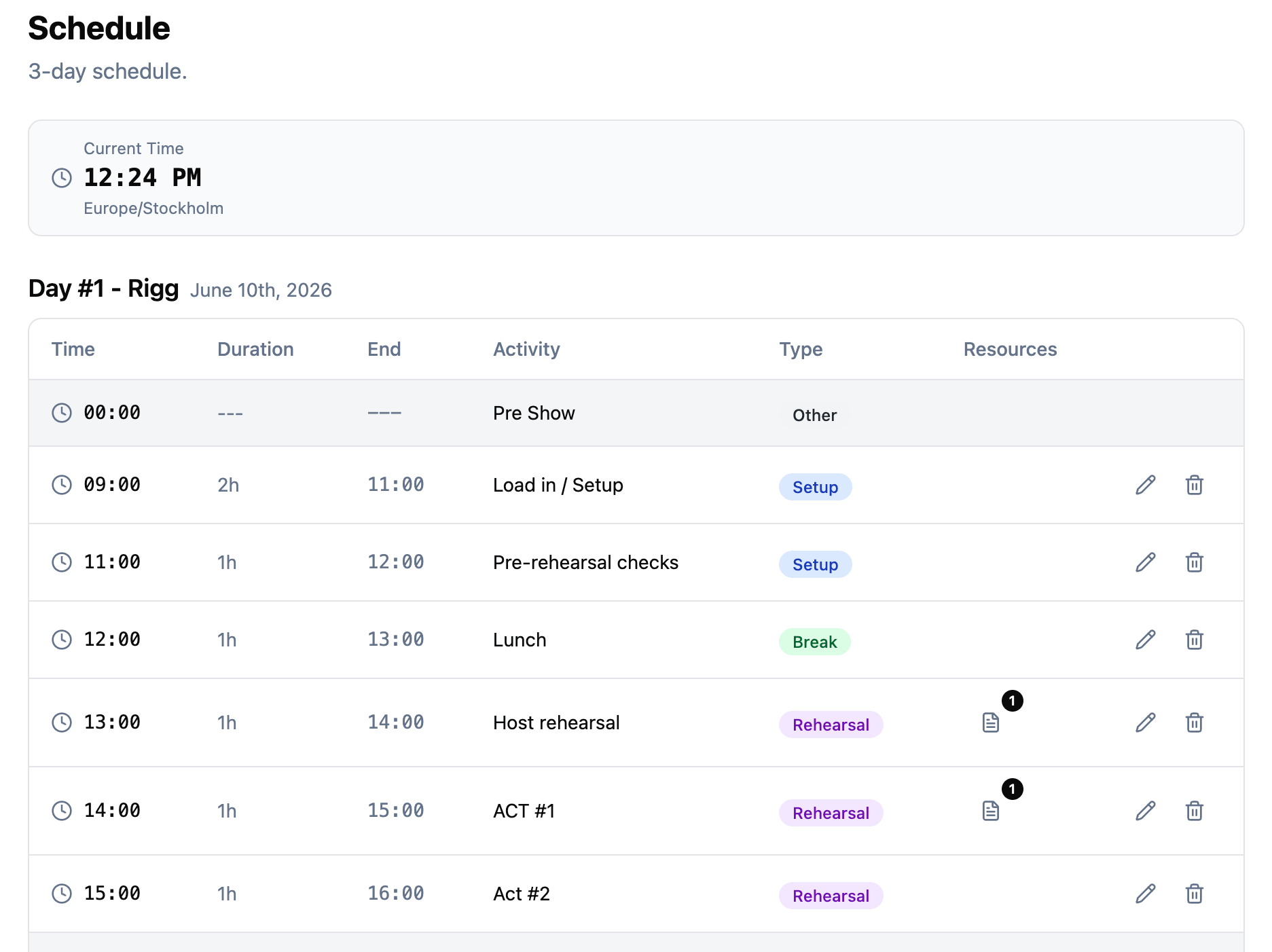 Figure: Building a run of show with timed items, types, and assignments — sharable with the whole crew.
Wrapping up
A run of show is not just documentation — it’s a communication tool. The better it’s built, the fewer questions your team asks during the day, and the smoother your production runs. Start with the template above, adapt it to your production’s complexity, and share it early.
Stay in the loop
Get product updates when new features ship. No spam, unsubscribe anytime.