May 17, 2026
Production Schedule Best Practices for Live Events
Learn how to build production schedules that keep live events running on time. Covers scheduling principles, common pitfalls, and practical tips from experienced producers.
By John Barker
Here’s a scene that plays out at every under-scheduled event: the audio team is still running cables when the lighting team arrives to focus. The lighting team can’t work because staging isn’t finished. Staging isn’t finished because the truck was late. And now the client is asking why sound check — scheduled for 10am — hasn’t started at 10:45.
The fix isn’t more people or better vendors. It’s a better schedule. One that accounts for dependencies, respects the laws of physics (two teams can’t occupy the same stage simultaneously), and builds in enough buffer that a 30-minute truck delay doesn’t cascade into a 2-hour disaster.
Here are the scheduling principles that experienced producers rely on.
The difference between a timeline and a schedule
A timeline is a high-level overview: “Load-in is Monday, rehearsal is Tuesday, show is Wednesday.” It tells you what happens on which day.
A schedule goes deeper: “Load-in starts at 06:00, audio arrives at 06:30, lighting rig is flown by 09:00, sound check at 10:00.” It tells you what happens at what time, for how long, and in what order.
Both are important, but the schedule is where coordination actually happens. Your vendors, crew, and talent need minute-level detail to do their jobs.
Core principles of good production scheduling
1. Work backwards from the immovable moments
Every production has fixed points: doors open at a specific time, the keynote starts at a specific time, the venue must be cleared by a specific time. Start with these and work backwards.
If doors open at 18:00 and you need 30 minutes for a final walkthrough, that means the walkthrough starts at 17:30. If the full tech rehearsal takes 2 hours and needs to finish before the walkthrough, it starts at 15:30. Keep working backwards until you reach the earliest call time.
2. Schedule departments, not just activities
“Sound check” is not one activity — it involves the audio team, the talent, sometimes the lighting team, and the stage manager. Make sure your schedule shows who is involved in each block so departments can plan their day.
3. Build in transitions
The time between activities is not zero. Striking one setup and building the next takes time. Moving people between rooms takes time. Even a 5-minute “walk to stage left” gap matters when the schedule is tight.
Explicitly schedule transitions rather than hoping they happen invisibly.
4. Respect crew hours
A schedule that starts at 05:00 and ends at 23:00 with no breaks is technically possible but practically dangerous. Tired crews make mistakes, and in live production, mistakes can be expensive or unsafe.
Build in meal breaks (minimum 30 minutes), rest periods between intense blocks, and keep total crew hours reasonable. Many unions and venues have rules about this, but even when they don’t, it’s good practice.
5. Create parallel tracks for simultaneous work
Not everything happens sequentially. While the audio team is sound-checking, the lighting team might be focusing. While the stage is being set, the catering team is setting up the green room.
Use parallel tracks (sometimes called “breakout blocks”) to show simultaneous activities clearly. This prevents the schedule from looking like everything takes twice as long as it actually does.
Common scheduling mistakes
Over-packing the day — Filling every minute with activities leaves no room for the unexpected. And the unexpected always happens.
Vague time blocks — “Setup” is not a useful schedule entry. “Rig main PA and test” tells the audio team exactly what’s expected.
Forgetting pre-show and post-show — Load-in, strike, and cleanup are part of the production day. They need scheduled time slots just like the show itself.
Not sharing the schedule early enough — A schedule distributed the night before doesn’t give people time to flag conflicts. Share it at least 48 hours in advance.
Single-source dependency — If the schedule lives only in one person’s head or one person’s laptop, it’s not a schedule. Use a shared, accessible format.
Scheduling techniques that scale
Time blocking
Group related activities into blocks with clear start and end times. A “Morning Setup” block from 06:00-10:00 might contain six individual activities, but the block gives the crew a high-level picture.
Color coding by type
Assign colors to activity types: setup (blue), rehearsal (purple), show (orange), break (green). This makes the schedule visually scannable. People can find “their” blocks without reading every line.
Day-of adjustments
No schedule survives first contact with reality. Build a process for day-of changes: who has authority to adjust times, how changes are communicated, and where the updated schedule lives.
A production planning tool with real-time updates helps here — when the production manager adjusts a time, everyone sees it immediately instead of waiting for an email or a new PDF.
Catch gaps and overlaps before they bite you
Two of the most common scheduling defects are silent killers: an unintended gap where the crew has nothing to do, or an overlap where two items claim the same minute. On a long day they’re easy to miss in a spreadsheet, and you only find out when someone is standing around or two teams arrive at the same stage.
ProductionPlanner.io flags both inline in the schedule. Hover the gap or overlap and a Fix button appears with two one-click options:
- Extend (or shorten) the previous item to absorb the difference
- Shift every following item earlier or later to close the gap or overlap
It is a small thing, but it turns a tedious round of recalculating start times into a single click, which means schedules actually get tidied up instead of left to drift.
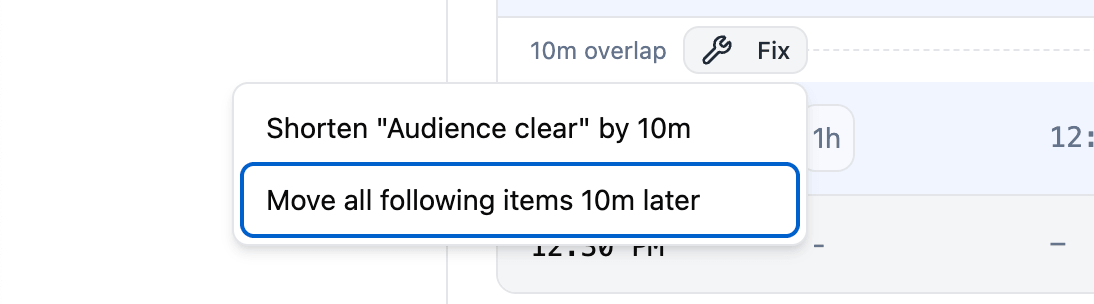 Figure: The Fix button on a gap or overlap offers two one-click corrections.
Digital scheduling tools vs. spreadsheets
Spreadsheets are the default for many productions, and they work for simple events. But they break down when:
- Multiple people need to edit simultaneously
- You need timezone-aware times for distributed teams
- You want linked resources (cue sheets, floor plans) attached to time blocks
- You need a mobile-friendly view for crew on the ground
- You want automatic end-time calculations
Tools like ProductionPlanner.io are built specifically for this: timezone-aware schedules, color-coded item types, team member assignments, linked files, and real-time sync across all devices. The schedule updates live, so your crew always has the latest version.
 Figure: Color-coded types and breakout tracks show parallel work clearly — no more “everything looks like it takes twice as long.”
Start building better schedules
Good scheduling is a skill, and it improves with experience. Start with the principles above, learn from each production, and invest in tools that make the process easier rather than harder. Your future self — and your crew — will thank you.
Stay in the loop
Get product updates when new features ship. No spam, unsubscribe anytime.